

Cart abandonment in WooCommerce usually happens when shoppers run into friction near the final step of the buying process. Unexpected costs, long or confusing checkout forms, limited payment options, and unclear delivery details often create hesitation, causing potential customers to leave before completing the order.
This guide shows how to reduce cart abandonment in WooCommerce by improving checkout clarity, speed, and trust. You will learn why shoppers abandon their carts, which WooCommerce checkout issues hurt conversions most, and the practical changes that can make the purchase process smoother, faster, and more reliable.
Quick Ways to Reduce Cart Abandonment in WooCommerce
To reduce cart abandonment in WooCommerce, make checkout faster, clearer, and easier to trust. The most effective fixes are showing full costs early, enabling guest checkout, simplifying checkout fields, offering popular payment methods, and clearly explaining shipping and delivery.
- Show total costs before checkout
- Enable guest checkout
- Remove unnecessary checkout fields
- Offer trusted payment options
- Display shipping and delivery details clearly
- Improve mobile checkout speed
- Add trust signals such as refund and contact information
Why Customers Abandon WooCommerce Carts
Customers abandon WooCommerce carts when the checkout process feels too costly, too slow, too confusing, or not trustworthy enough to finish. Most drop-offs happen when shoppers face friction or uncertainty near the final step. Below are the most common reasons shoppers leave before completing their order.
Unexpected Costs
Unexpected costs often appear when shipping fees, taxes, or extra charges are shown too late in the buying process. When the final total is higher than expected, shoppers may feel surprised, question the value of the order, or leave before payment because the purchase no longer feels clear or affordable.
Slow And Confusing Checkout
A checkout that feels slow, cluttered, or difficult to follow can interrupt buying intent at the final step. Long forms, too many steps, unclear field labels, and poor mobile usability make the process feel harder than it should, causing shoppers to lose patience and abandon the cart before finishing.
Forced Account Creation
Many shoppers want to complete their order quickly without creating an account first. When registration is required before checkout, it can feel like an unnecessary barrier that slows the process down. This extra step often creates friction for first-time buyers and increases the chance of abandonment.
Limited Payment Options
Shoppers expect to pay with methods they already know and trust. If their preferred card, wallet, or local payment option is unavailable, they may hesitate or leave rather than use an unfamiliar alternative. Limited payment choices can make checkout feel restrictive and reduce confidence at the final step.
Unclear Shipping And Delivery Information
When shipping costs, delivery times, available methods, or service area limits are not explained clearly, shoppers may hesitate before placing the order. Uncertainty around how and when the product will arrive adds doubt to the purchase and often pushes customers to leave without completing checkout.
Lack Of Trust At Checkout
Trust becomes especially important when shoppers are ready to enter personal and payment details. If checkout lacks refund information, clear contact details, secure payment messaging, or consistent branding, the store may feel less reliable. Even small trust concerns can be enough to stop a customer from completing the purchase.
How to Reduce Cart Abandonment in WooCommerce?
Cart abandonment usually happens when checkout feels confusing, expensive, slow, or risky. Reducing it means removing the small blockers that make people pause and leave. When the cart and checkout feel clear, fast, and trustworthy, more shoppers complete the order without second thoughts. Here is how to reduce cart abandonment in WooCommerce.
Make Total Costs Clear Early
Show the full cost early, including shipping, taxes, and any extra fees, so shoppers are not surprised at the final step. Add an estimated shipping message on the cart page and show totals clearly in checkout. When people can predict the final price, they feel safer continuing.
Keep Checkout Fast And Easy
A slow checkout or messy layout makes people lose patience, especially on mobile. Reduce the number of form fields, remove unnecessary distractions, and make buttons easy to find and tap. Tools like One Page Quick Checkout for WooCommerce can also help by shortening the steps and keeping the buying flow in one place.
Offer Guest Checkout
Many shoppers want to buy quickly and do not want to create an account during checkout. Guest checkout removes that barrier and keeps the flow smooth. You can still offer account creation after the order, or add a simple checkbox that lets them save details without forcing signup.
Add Popular Payment Options
Customers feel comfortable paying with methods they already trust and use often. Offer card payments and add popular wallet or local payment methods that match your audience. When the preferred option is missing, shoppers may abandon the cart rather than try something unfamiliar or worry about payment safety.
Show Delivery Details Clearly
Unclear delivery information creates hesitation, even when shoppers like the product. Show estimated delivery time, shipping methods, and shipping cost in clear words. If your store has location limits, mention service areas early. When delivery feels predictable, shoppers are more likely to continue to payment.
Build Trust At Checkout
Checkout is the moment when shoppers decide if your store feels safe. Add clear return and refund details near checkout, show contact options, and keep branding consistent so the page looks reliable. Also, reduce errors by using clear field labels and helpful messages, because confusion can feel like a risk.
When Default WooCommerce Checkout Is Not Enough
Default WooCommerce checkout works for many stores, but it may not be enough when the buying process needs more speed, flexibility, or conversion-focused control. If checkout friction continues after basic improvements, a stronger setup or plugin can help solve the limits that the default experience cannot address easily.
Below are the situations where store owners usually need more than the default WooCommerce checkout.
- Checkout Still Feels Too Long: If shoppers must move through too many fields or steps, the default flow may create more friction than necessary for faster purchases.
- Mobile Checkout Performance Is Weak: When checkout feels harder to use on smaller screens, a more optimized system can improve layout, speed, and usability.
- You Need More Field Control: Some stores need to remove, reorder, or simplify checkout fields more than the default setup allows.
- The Buying Journey Needs Fewer Steps: For focused offers, landing pages, or faster transactions, one-page checkout can keep product selection and payment in a simpler flow.
- You Want Better Checkout Customization: A stronger checkout plugin can help you adjust layout, structure, and user experience without relying heavily on custom development.
- Recovery And Conversion Tools Are Missing: If you want features like abandoned cart recovery, streamlined checkout design, or conversion-focused controls, the default checkout may feel too limited.
Using One-Page Checkout Plugin to Reduce Cart Abandonment
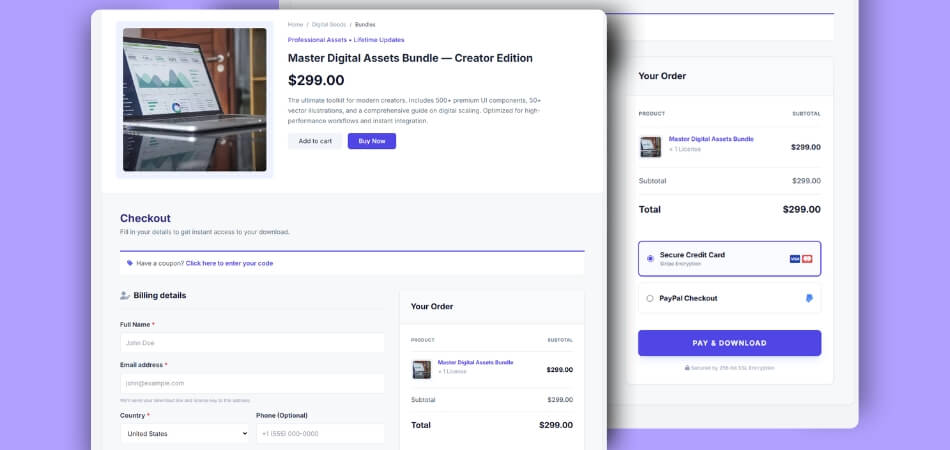
Reducing checkout steps is one of the most reliable ways to lower cart abandonment. We are taking one page quick checkout for WooCommerce, for example, as it combines product selection, cart review, and checkout into a single, continuous flow.
This setup is especially effective for mobile users, paid traffic, and focused product pages where speed and clarity matter most.
Step-by-Step Setup Guide
Installation (Free Version)
- Go to the WordPress Admin Dashboard and open Plugins
- Click Add New Plugin
- Search for “One Page Quick Checkout for WooCommerce”
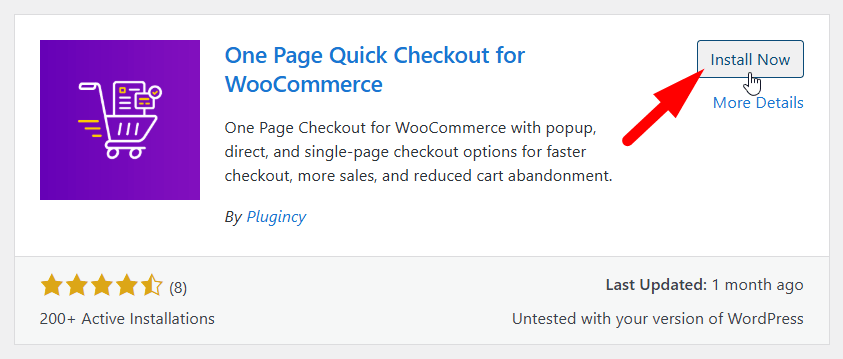
- Click Install Now and then Activate
Installation (PRO Version)
- Purchase the PRO version from the official website
- Download the plugin ZIP file from the purchase email
- Log in to your WordPress admin dashboard
- Go to Plugins > Add New and click Upload Plugin
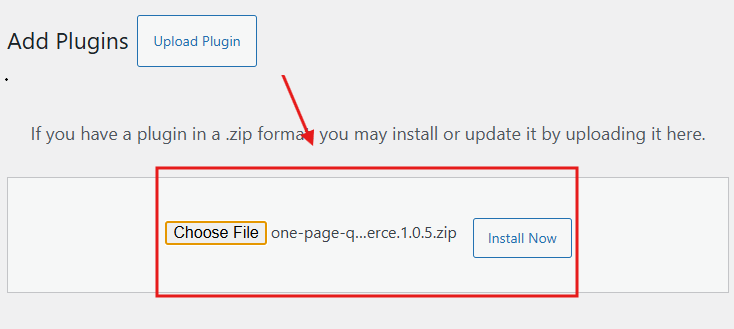
- Select the ZIP file and click Install Now
- Activate the plugin after installation
- Navigate to One Page Quick Checkout settings
- Enter your license key to unlock PRO features
Configuration and Usage
- Enable one-page checkout mode from the plugin settings
- Place the checkout layout on product pages or landing pages
- Remove unnecessary checkout fields to reduce effort
- Test the full flow on both mobile and desktop devices
By eliminating page switches and reducing checkout friction, this approach helps boost Conversion Rates in WooCommerce. Many store owners also measure the quick checkout impact on WooCommerce conversions, particularly for mobile traffic and advertising campaigns where speed directly affects results.
When One-Page Checkout Works Best?
One-page checkout does not fit every store equally. Its real value appears when speed, focus, and reduced friction matter more than deep product configuration. Understanding where it performs best helps you apply it strategically.
Small to Mid-Size Product Catalogs
Stores with a limited number of products benefit most because customers can make quick decisions without needing extended comparisons. One-page checkout keeps the flow simple, reduces cognitive load, and helps shoppers complete purchases without distractions or unnecessary steps slowing them down.
Single-Product or Focused Offers
When a store promotes one main product or a tightly focused offer, one-page checkout performs exceptionally well. Buyers usually arrive with intent, and removing intermediate cart steps helps maintain momentum, leading to faster decisions and fewer exits before payment completion.
Mobile-First Traffic
Mobile shoppers are more sensitive to slow loading and complex navigation. One-page checkout reduces scrolling, page reloads, and form fatigue on smaller screens. This streamlined experience helps mobile users complete purchases more comfortably and with fewer interruptions.
Paid Ads and Landing Pages
Traffic from ads and campaigns often has a limited attention span. One-page checkout aligns well with landing pages by keeping users focused on a single action. Reducing steps helps preserve intent and improves the chances of converting paid clicks into completed orders.
One-page checkout delivers the strongest results when matched carefully to traffic source, product complexity, and buyer intent rather than applied universally.
When Cart Abandonment Becomes a Real Business Problem?
Cart abandonment is not always a warning sign, but under certain conditions, it directly impacts revenue growth and marketing efficiency. The points below explain when it shifts from a normal behavior pattern into a serious business issue.
- High Traffic But Flat Revenue: When your store attracts consistent, high-quality traffic but completed orders do not increase, cart abandonment becomes a revenue blocker. In this case, marketing spend rises while actual sales remain stagnant.
- Strong Product Interest With Weak Checkout Results: Products receiving views, add-to-cart actions, and engagement indicate buying intent. If users still exit at checkout, the issue lies in the purchase process, not the product itself.
- Repeated Exits At The Checkout Stage: Frequent drop-offs during checkout usually point to friction such as unclear pricing, slow loading, complicated forms, or trust concerns. These problems create hesitation at the final decision moment.
- Increasing Acquisition Costs With No Conversion Lift: As ad and traffic costs increase, unresolved checkout issues amplify losses. Each abandoned cart represents wasted acquisition effort rather than a lack of demand.
When abandonment aligns with these signals, optimizing checkout flow often delivers immediate conversion gains without increasing traffic or ad spend.
Tracking and Continuous Optimization
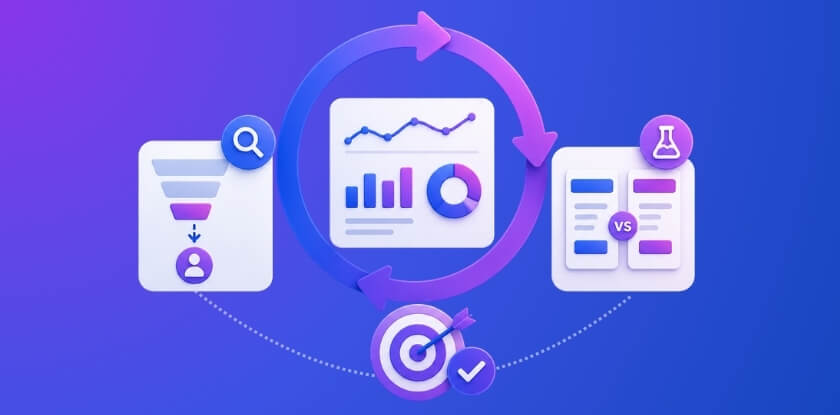
Cart abandonment patterns change over time as traffic sources, devices, and checkout behavior evolve. Continuous tracking and refinement help you spot new friction early and adjust before it impacts revenue, making optimization an ongoing process rather than a one-time fix.
Analyze Drop-Off Points
Use analytics tools to identify the exact stage where users leave the cart or checkout flow. Focus on the step with the highest exit rate, such as shipping selection or payment entry. Fixing the most common drop-off point first helps boost Conversion Rates in WooCommerce with minimal effort.
Test Checkout Variations
Experiment with checkout field order, button text, and layout structure to see what performs better. Small changes, such as simplifying form flow or improving call-to-action clarity, often result in measurable conversion gains without major design or development work.
Regular testing keeps checkout performance aligned with real user behavior and prevents minor issues from turning into long-term revenue loss.
How to Measure Success?
Reducing cart abandonment only matters if the changes deliver measurable results. Tracking the right metrics helps you confirm what works, identify weak points, and make informed decisions based on real customer behavior rather than assumptions.
- Cart Abandonment Rate: Shows how many people add products to the cart but leave without going to checkout. A drop here often means the cart page feels clearer and easier to use.
- Checkout Abandonment Rate: Tracks shoppers who start checkout but do not finish payment. A lower number usually means checkout is faster, simpler, or offers better payment options.
- Checkout Completion Rate: Measures how many checkout sessions turn into successful orders. Higher results often point to fewer errors, fewer confusing steps, and better trust signals.
- Revenue Recovered From Abandoned Carts: Tells you how much money comes back from reminder emails or recovery messages. Growth here means follow-ups are working and bringing shoppers back.
- Mobile Versus Desktop Conversion Performance: Comparing mobile and desktop results helps identify device-specific issues. Improvements on mobile often signal better layout, faster loading, or simplified input fields.
Measure these metrics weekly and compare before-and-after results for each change. Consistent tracking turns optimization into a predictable growth process rather than guesswork.
Frequently Asked Questions
After understanding the causes and solutions for cart abandonment, many store owners still have practical questions before making changes. These frequently asked questions address common concerns that usually come up right after reviewing the full strategy.
Does Guest Checkout Really Affect Purchase Decisions?
Guest checkout removes the pressure of account creation at the final step. It helps first-time buyers finish faster without commitment. Returning customers can still create accounts later, keeping both speed and long-term loyalty balanced.
Can Discounts Increase Cart Abandonment Over Time?
Discounts can recover carts, but overuse trains shoppers to wait. Small incentives work best when timed after hesitation, not instantly. Testing different values helps you recover sales without hurting perceived product value.
Do Page Builders Cause Checkout Problems In WooCommerce?
Page builders can add scripts that slow down checkout or block payment fields. Conflicts often appear only on mobile devices. Testing checkout with and without builder elements helps isolate issues before customers experience failures.
Why Do International Stores Face Higher Cart Abandonment?
International stores face extra friction from taxes, duties, and address rules. Clear country-based estimates reduce confusion early. Showing local payment methods and delivery expectations builds trust across regions and lowers abandonment.
How Can Checkout Changes Be Tested Without Risk?
Testing checkout changes on a live store needs care. Small controlled updates limit risk while data is collected. Using staging environments or short test windows protects revenue and customer experience during optimization.
Concluding Words
Cart abandonment is not a traffic problem. It is usually a checkout experience problem that shows up at the final step. Once you understand where users hesitate, fixing those points becomes much easier and more predictable.
Learning how to reduce cart abandonment in WooCommerce means focusing on clarity, speed, and trust. Small changes in checkout flow, pricing visibility, and performance often lead to steady conversion growth without spending more on ads.